| General |
| Undo/redo |
unlimited or user-defined number of levels |
|
| Copy/Paste and Drag/Drop |
within or between models |
|
| Find |
Find any object in the model by its type, name
or any other property. Search using regular expressions and other common
search criteria. |
|
| Reporting |
maximum reporting flexibility by using XSLT
Templates to generate reports. |
 |
| Impact Analysis |
the transaction history shows the full
impact of any change that you make as you make it. View, save or print this info or use it
to roll back changes. |
|
| Solid Foundation |
Building on over 15 years
of experience developing database design software, ModelRight for Oracle
has been completely written from scratch with an object/property framework that
offers significant design tool functionality and provides a solid
foundation on which to continue to move forward. |
|
| ActiveX/Scripting |
used internally to generate the database schema, a scripting interface
(using any COM-based scripting languages – like VBScript, .NET languages
and javascript) provides access to model objects
and properties for any purpose. |
|
| User Interface |
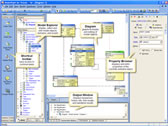 |
| Model Explorer |
an expandable/collapsible, categorized
tree view of all your model objects. |
|
| Mode-less |
Our innovative mode-less style of
interaction is simple and intuitive.
Just click on an object in either the Model Explorer or Diagram to
edit its properties. No need to pop
up dialog on top of dialog to make changes. |
|
| Hyperlinked Navigation |
navigate to related objects
by clicking hyperlinks on property pages.
Navigate backwards and forwards in the selection history using >the navigate back/forward controls. |
|
| Display Options |
change font,
color, 2D or 3D outlining, solid or gradient fill. Display table columns in Pk/non-Pk or generation order, Pk
columns only or table comment. Display
any child category (i.e. column, index, key, trigger, etc…) along with the
table. Hide/display,
expand/collapse the table display. |
 |
| On-diagram Editing |
create, delete, rename objects
right on the Diagram. For columns,
you can also change datatype, domain, PK option, and null option right on
the Diagram. |
|
| Misc. Graphics |
add text, rectangles, images, lines,
circles, etc… as a backdrop to or to add interest to your Diagram. |
|
| Notation |
Barker, IE, and IDEF1X notations are all
supported. |
 |
| Auto Layout |
|
|
| Modeling |
| Domains |
Domains are simply objects that define properties
that can be inherited by other objects of that type. For example, a Diagram could inherit its
background color from a Diagram Domain. If you change the background color of a Diagram Domain, all of the Diagrams
and Diagram Domains that inherit that property would change. Many products define something akin to a
Column Domain – so that a datatype can be consistently applied to a set of
columns, but ModelRight for Oracle extends this capability by introducing many more types of
domains (Tables, Materialized Views, Relations, Columns, Indexes, Diagrams, Tablespaces, Graphics, etc..). |
|
| Relations |
display,
edit, and generate many types of relations - table relations, view relations, “select from”
relations, and REF relations. |
|
| Compare with Model |
compare models to see their differences and exchange information. |
|
| Naming |
naming
options let you specify how to handle non-unique name conflicts and max name
lengths. |
|
| Model Subsets |
group
your tables and/or views into different subsets for display or other purposes. |
|
| Key migration |
specify whether you would like to migrate the columns
of a key (alternate or primary), define which columns to migrate manually, or
specify no migration. |
|
| Unification |
migrated
columns are unified in the child table with other columns that have the same
name. |
|
| Rolenaming |
By
default, a migrated column has the same name as it has in the parent
column. This is maintained
automatically. So if the parent column
name changes, the child column will also.
With rolenaming, you can specify that a migrated column should have a
different name than it does in the parent table. |
|
| User-defined Properties |
create your own properties and associate them with different types
of model objects. |
|
| Model Validation |
run an interactive report to
show invalid and incomplete model objects.
Click on the report items to correct the issue. |
|
| Incomplete objects |
objects that have not been fully specified are colored red in the Model Explorer
for quick identification. Display a
message box or run Model Validation to see why. |
|
| Database |
| Forward Engineering |
ModelRight for Oracle makes the schema generation process completely transparent and user-extendible
through the use of VB Scripts. VB
scripts (or any COM enabled program) access the model’s objects and properties
to generate the database schema. Use
the scripts we provide or overwrite them at the table, model, or cross-model
level. |
 |
| Reverse Engineering |
connects directly to using a native driver.
Filter by schema, storage, object type and expression to pick exactly
what you want from your database. |
 |
| Database Compare |
compare your model with the current database to
update the database with an ALTER script or your model with changes. |
 |
| Oracle support |
Table, View, Materialized View, Index, Constraint (PK,
FK, UK),
Tablespace, Cluster, Sequence, Package, Procedure, Function, Trigger,Synonym, Schema, etc… Index-organized tables, Table and Index (Local and Global)
Partitions, LOB storage options, REF columns, Function-based indexes, etc… |
|
| Object-Relational |
create new Types, attributes, object tables/views, etc… |
|
| Views and Materialized Views |
keeps the view up to date even when the referenced objects
change. Changes made to the underlying objects
are automatically reflected in the View definition. |
|